Play XTreeGold Online
Navigate your files, manage directories, and organize data by copying, moving, or deleting in XTreeGold for MS-DOS.
XTreeGold was part of the MS-DOS Classic Games collection, a tool developed by Executive Systems to help users manage their files without needing to remember complex command line entries. It arrived during a time when organizing data on a computer felt more like a chore than a feature, offering a visual structure that made sense of the chaos.
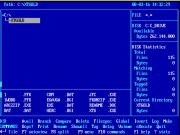
You control a cursor to navigate a hierarchical tree of your directories, expanding and collapsing branches to see nested files. The main objective is to manage your data efficiently; you can copy, move, delete, or view files, and one of its signature mechanics is the ability to zip and unzip archives directly from the interface. Another key feature is the dual-pane view, which allows for easy drag and drop operations between folders. The pacing is deliberate, focused on precision rather than speed, and while it isn't difficult in a traditional sense, mastering its shortcuts saves considerable time. It feels like finally having a clear map for a cluttered digital attic.
Each game uses different controls, most DOS games use the keyboard arrows. Some will use the mouse , "Alt" ,"Enter" and "Space bar".
Download XTreeGold Game
You can download this ROM to play XTreeGold offline using an MS-DOS emulator (Top Emulators).
*This ROM is provided for backup and educational purposes only.


